🎮 Game Controls & Keyboard Guide
Butterfly Triple: The Ultimate Puzzle Challenge
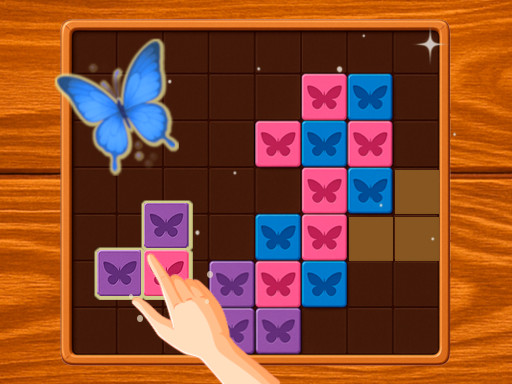
Butterfly Tripple is a bright and relaxing puzzle game where you merge cute butterflies! Place the shapes on the board so that three or more butterflies of the same color touch each other. When they connect, they’re released and gracefully fly away. Vivid graphics, smooth animations, and a cozy atmosphere make the game a true pleasure to play.
Get ready for an adrenaline-fueled experience with Butterfly Triple, an exceptional Puzzle game that pushes your skills and reflexes to their absolute limits.
Complete Guide & Gameplay for Butterfly Triple
To excel in Butterfly Triple, start by familiarizing yourself with the responsive controls. As the difficulty scales, maintaining composure and steady rhythm will be key to conquering high levels.
This classic Puzzle browser title is fully optimized for HTML5 browsers, delivering responsive physics and immersive action on desktop, mobile, and tablet platforms without downloads.
⭐ Pro Tips & Strategy
Plan at least 2 to 3 moves ahead rather than making instantaneous impulsive matches. Work from the bottom of the screen upward to trigger natural cascading chain reactions.
⚡ Key Features
📱 Cross-Platform Ready
Flawless gameplay experience on PC, Laptop, Chromebook, iPhone, iPad, and Android.
⚡ Instant Browser Play
No installation, downloads, or plugins required. Loads in seconds directly in HTML5.